Wirecast Pricing & Plans

The most powerful, customizable live video streaming and production tools forMac and Windows.

Wirecast Logo

Wirecast Studio


Billed Monthly

$59/mo

Buy Monthly

Billed Yearly

$59$34/mo

Buy Annual

Save $300/yr!

  • Mac & Windows
  • Unlimited Live Camera Sources
  • NDI™ Input Only
  • Screen Capture
  • IP Cameras and Web Stream Input
  • Supported GPU-Accelerated Encoding
  • 2 Rendezvous Remote Guests
  • Integrated Stock Media Library (500,000+ Assets)
  • Dedicated Technical Support Team
  • 1-4 Slot Multi-Viewer Output

Studio Workflow Diagram

Wirecast Studio Typical Hardware Workflow

Click to enlarge diagram

More Setup Info (PDF) (opens in a new window)

Best Value
Wirecast Logo

Wirecast Pro


Billed Monthly

$79/mo

Buy Monthly

Billed Yearly

$79$42/mo

Buy Annual

Save $444/yr!

Everything in Studio, plus:


Advanced Pro Workflow Diagram
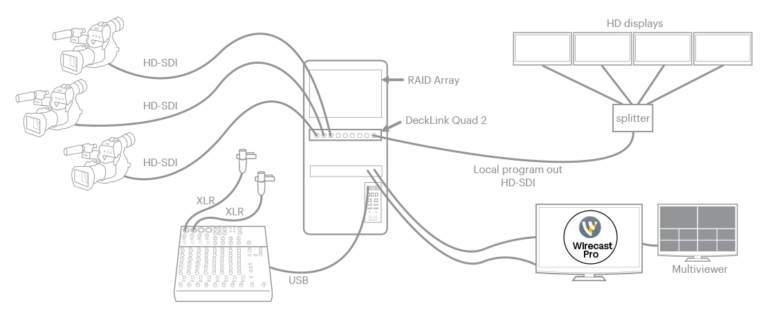
Wirecast Pro Advanced Broadcast Workflow

Click to enlarge diagram

More Setup Info (PDF) (opens in a new window)

The Wirecast Workflow

A high-level overview of how audio, video, and network sources flow through your hardware, into Wirecast, and out to your audience.

Audio/Video Sources

Devices:
  • Cameras: SD/HD SDI, HDMI, USB, USB-C, and Thunderbolt
  • iOS / Wirecast Go
  • Microphones: USB, Line In, XLR
  • Audio interfaces, mixers, and ASIO devices
Web/IP & Other:

Hardware Capture

Computers:
  • Mac (Apple Silicon & Intel)
  • Windows PC
  • Wirecast Gear (Win10)
  • Note: Quad-core processor recommended.
Video Capture:
  • PCIe, Thunderbolt, USB 3.0/3.1
  • AJA
  • Blackmagic Design
  • Magewell and more…

Encoding

Software Encoding:
  • X264, H.264
  • RTMP, SRT
  • ProRes, MJPEG
  • AAC, and WMV
Hardware Accelerated:
  • Intel QuickSync
  • nVidia NVENC
  • Apple H.264

Destinations

Deliver to:
  • YouTube, Facebook, X (formerly Twitter), and more
  • CDNs & Streaming servers
  • Record to disk via ISO Recording
  • Virtual camera and microphone out
  • HD-SDI output
  • Multi-viewer
  • Live program out via hardware
  • NDI output (Pro feature)
  • Secondary Live Display ouput

Detailed Technical Specifications & System Scaling

Supported Operating Systems

macOS Compatibility macOS Sequoia 15 or macOS 26 Tahoe.
Windows Compatibility Windows 10 (version 1809 or higher), Windows 11 (21H2, 24H2 natively supported).

Hardware Capability Baseline

Minimum Baseline
Processor (CPU): Intel® 6th Generation or newer CPU – or AMD Ryzen™ 1000 Series or newer CPU; Apple M1 or newer. Note: May be insufficient for 1080p+ or 60 fps workflows.

Memory (RAM): 8 GB of standard RAM.

Graphics Engine (GPU): Intel HD Graphics, 2 GB video memory, DirectX 11 capable; Apple Silicon: 8 GB of unified memory. Note: Insufficient for advanced Multi-Viewer workflows.

Storage / Hard Drive: 7200 RPM Hard Drive (HDD) required for local record-to-disk pipelines.
Recommended (Pro) Optimal Target
Processor (CPU): Intel® 7th Generation or newer CPU – or AMD Ryzen™ 3000 Series or newer; Apple M1 or newer.

Memory (RAM): 16+ GB of RAM; Apple silicon: 16 GB of unified memory.

Graphics Engine (GPU): Dedicated Nvidia GeForce, 4GB+ video memory, DirectX 12 capable; Apple silicon: 16 GB of unified memory.

Storage / Hard Drive: High-speed Solid State Drive (SSD) or fast RAID array for flawless local multi-track ISO capture and Replay functionality.

Network Stack & Best Practices

Required Ports & Bandwidth

Bandwidth Baseline: Total bitrate needed x 2 = Required upload bandwidth. Upload speed can be tested at websites such as TestMy.net/upload.

Ensure these network ports are open for traffic:

  • 53 (DNS), 80 (HTTP/HTTPS), 443 (SSL)
  • 1935 (RTMP), 2935 (RTMPS)
  • 3478 / 5349 (STUN/Rendezvous peer-to-peer)
  • 5353 (mDNS for local NDI source discovery)
  • 5960-59xx (NDI port range, 1 port per active source)
  • 7272 (Remote Desktop Presenter)
  • 49152-65535 (WebRTC Media/Rendezvous – selected dynamically)
If behind a strict network firewall, check with your streaming target destinations for explicit domain whitelisting guidelines.
Hardware Acceleration Requirements
  • Intel Quick Sync Video: Requires an Intel CPU with an active Intel® QuickSync Video core.
  • NVIDIA NVENC: Requires a dedicated NVidia GPU featuring Kepler architecture or newer.
  • Apple Hardware H.264: Natively utilizes modern Apple Silicon unified pipelines or designated Mac processing arrays.
Rendezvous & Encoding Guidelines

Rendezvous utilizes WebRTC streams which scale system compute targets. Based on single simultaneous 720p30 streams @ 4.0Mbps:

  • Studio (2 Guests): Allocate +4 Mbps bandwidth | i5 quad-core CPU baseline.
  • Pro (7 Guests): Allocate +5+ Mbps bandwidth | i7 quad-core CPU baseline.

High Frame-Rate (60fps) & CPU Stack: Maintained system CPU usage exceeding 60% increases dropped frame likelihood. Consider lowering target canvas resolutions if resource saturation occurs.

Supported Languages

Wirecast interface controls, menus, and production toolkits are fully unlocked and available across 12 distinct localized languages:

English Flag English
Brazilian Portuguese Flag Brazilian Portuguese
Simplified Chinese Flag Simplified Chinese
Czech Flag Czech
French Flag French
German Flag German
Italian Flag Italian
Japanese Flag Japanese
Korean Flag Korean
Dutch Flag Dutch
Spanish Flag Spanish
Swedish Flag Swedish

Wirecast Comparison Chart

See which software version has the right tools to power your productions.

Capture Professional Audio/Video

Studio
Pro
Support for multiple simultaneous video capture & live inputs (e.g. USB, Capture Card, NDI, Wirecast Go, Webstream IP sources)
Studio No limit
Pro No limit
Works natively with UVC, DirectShow, and AVFoundation capture devices (e.g. Epiphan)
Studio
Pro
Advanced internal integration support for capture hardware from Blackmagic Design, Magewell, and AJA
Studio
Pro
Native NDI™ stream protocol input source ingestion (Mac/PC)
Studio
Pro
Local Network Wi-Fi iOS camera integration via Wirecast Go app
Studio
Pro
Web stream pipeline ingestion across RTMP, MMS, HTTP, RTSP, HLS, MPEG-Dash, and UDP target protocols
Studio
Pro
Desktop screen capture and Remote Desktop Presenter interface integration
Studio
Pro
ASIO and WASAPI professional multi-channel audio capture device mapping (Windows Only)
Studio
Pro
Wirecast Rendezvous Remote Guest peer-to-peer conferencing capacity limits
Studio 2 Live Guests
Pro 7 Live Guests

Produce Engaging Broadcasts

Studio
Pro
Advanced visual layout compositing limits per scene container
Studio 50 Sources / Shot
Pro 50 Sources / Shot
Shot Templates, Placeholders, and independent Audio/Video hardware sync delay mapping
Studio
Pro
Real-time GPU-accelerated Chroma Key, Luma Key, and Color Key green screen extraction engines
Studio
Pro
Integrated live Social Media Comment Moderation overlays (Facebook, YouTube) & Polling integration
Studio
Pro
Unlocked Stock Media Library access (Over 1,000,000 royalty-free videos, music tracks, and graphic layers) *1st year Stock Media Library subscription included with purchase
Studio
Pro
Advanced Audio Mixer mapping layouts and level balancers
Studio
Pro
External hardware controller surface support (e.g. X-Keys USB configurations)
Studio Sold Separately
Pro Sold Separately
PTZ Camera Control interface integration (VISCA over IP control logic)
Studio
Pro
Professional Audio FX toolkits, multi-channel track mapping, and dynamic image layer filters (Mattes)
Studio
Pro
Built-in customizable real-time scoreboards, sports game clocks, and automated countdown timers
Studio
Pro
3D Virtual TV Studio presentation set parameters
Studio
Pro

Stream Live & Output Destinations

Studio
Pro
Simultaneous output broadcasts and local hard drive recordings
Studio Unlimited
Pro Unlimited
Native API streaming destinations (e.g. YouTube, Facebook Live, Twitch, Vimeo, Wowza, LinkedIn, Custom RTMP/SRT)
Studio
Pro
Hardware-accelerated encoding pipelines (Intel QuickSync, nVidia NVENC, Apple H.264)
Studio
Pro
Virtual camera and virtual microphone outputs
Studio
Pro
Multi-viewer output monitor configuration limits
Studio 1-4 Slot Layout
Pro 1-17 Slot Layout
Secondary Display Live Output
Studio
Pro
ISO (Isolated) Recording controls across individual source feeds
Studio
Pro
Physical program output distribution via supported baseband hardware cards (e.g. AJA, Blackmagic Design SDI)
Studio
Pro
Native NDI™ program output broadcasting directly across local subnets
Studio
Pro
Multi-Track audio channel mixing output routing
Studio
Pro
Quick Comparisons

Remote Guests

2 (Studio) vs 7 (Pro)

Multi-viewer Output Slots

4 (Studio) vs 17 (Pro)

Cloud Streaming

Pro Only

Stock Media

Included with Both

Need Wirecast for a large team or school? We offer custom plans and volume discounts. Contact Sales Team

See What You Can Create With Wirecast

Explore our library of related resources.

Explore All Resources

Feature Glossary & FAQ

Everything you need to know about the tools inside Wirecast.

Wirecast is natively built for both Mac and Windows operating systems. To ensure your live streams run smoothly with minimal CPU usage, Wirecast utilizes Supported GPU-Accelerated Encoding, offloading the heavy lifting to your graphics card for pristine, stutter-free performance.

Both Studio and Pro plans allow for Unlimited Live Camera Sources. You can connect webcams, capture cards (SDI/HDMI), iOS devices, and perform Screen Captures of your desktop. You can also pull in network sources like IP Cameras and Web Streams (RTMP, RTSP). If you use Wirecast Pro, you also gain PTZ Camera Control, allowing you to pan, tilt, and zoom compatible robotic cameras directly from the Wirecast interface.

Rendezvous is Wirecast’s built-in peer-to-peer conferencing system. Send a simple browser link to a guest, and their webcam and microphone feed instantly drops into your Wirecast document as a network source for your production. Wirecast Studio supports up to 2 Rendezvous Remote Guests, while Wirecast Pro allows for massive panels with up to 7 Rendezvous Remote Guests simultaneously.

Wirecast comes with Built-in Integrations to natively log in and stream directly to Facebook Live, YouTube, Twitch, Vimeo, LinkedIn, and more, as well as any custom RTMP server. For Wirecast Pro users, you get access to Cloud Multistreaming, which allows you to send a single stream to the cloud, and the cloud redistributes it to multiple platforms, saving your local bandwidth.

Both plans include NDI™ Input, meaning you can pull high-quality, low-latency video and audio from other NDI-enabled devices on your local network (like a second PC or an NDI camera) into Wirecast. Wirecast Pro unlocks NDI™ Output, which lets you broadcast your final, polished Wirecast feed back out over the network for other switchers, screens, or projection systems to capture.

A multi-viewer allows you to send a grid of your camera feeds to an external monitor so you can see all your angles at a glance—just like a traditional TV control room. Wirecast Studio includes a 1-4 Slot Multi-Viewer Output, while Wirecast Pro expands this to a massive 1-17 Slot Multi-Viewer Output for complex, multi-camera productions.

Available in Wirecast Pro, ISO (Isolated) Recording lets you record clean, high-quality video files of your individual camera feeds separately from your main broadcast for post-production editing. Similarly, Multi-Track Audio Recording allows you to route and record up to 8 separate audio tracks independently, giving you ultimate control over your audio mix in post.

Exclusive to Wirecast Pro, the Sports Production Tools unlock native instant replay systems, live data-driven scoreboards, custom game clocks, and timers, allowing you to produce broadcast-quality athletic events right out of the box.

Every active Wirecast subscription gives you full access to our Integrated Stock Media Library containing over 1,00,000 royalty-free videos, music tracks, lower thirds, and backgrounds. You also get priority assistance from our Dedicated Technical Support Team to ensure your broadcasts never miss a beat.

Yes! By choosing to be billed yearly instead of monthly, you secure a massive discount. Based on current pricing, the Annual plan saves you $300 a year on Wirecast Studio and $444 a year on Wirecast Pro.
Compatible with Mac & Windows