Introduction
Wirecast is professional software for live Internet broadcasting.
Topics
Introducing Wirecast
Wirecast has tools for each step of a broadcast: capture, switching, and streaming. Wirecast is available in two versions: Studio and Pro.
Note: A broadcast in this guide means an audio-video stream, with related data, sent typically over the Internet.
Insider Access Support
Both Studio and Pro include one year of Insider Access Support. This includes:
•Free updates
•Access to the Stock Media library
•Access to the Knowledgebase
•On-demand video training
•Email support
Insider Access Support responds within eight business hours.
Wirecast Studio Features
•Capture
–Unlimited inputs
•Conferencing
–Two remote guests
–Rendezvous
•Production
–4096 x 3072 maximum resolution
–Five composite layers
–Lower-third animated titles
–Titling
–Chroma key
–Transitions
–Playlists
–Audio mixer
–Social-media comment moderation
•Outputs
–Multiple simultaneous record-to-disk locations
–Virtual camera
–Mic
–1-4 slot unlimited multi-viewer
Wirecast Pro Features
Wirecast Pro includes all the features of Wirecast Studio, plus the following:
•Advanced capture
•Advanced conferencing
–Rendezvous for seven remote guests
•Advanced production
–PTZ camera control
–Pro audio FX
–Virtual sets and backgrounds
•Sports production
–Instant replay
–Scoreboards
•Advanced outputs
–Baseband SDI/HDMI
–NDI program
–Secondary display
–1-17 slot multi-viewer
•ISO recording of sources
•Multi-track audio recording
Features available only in Wirecast Pro are indicated by this Pro icon:

Wirecast Workflow
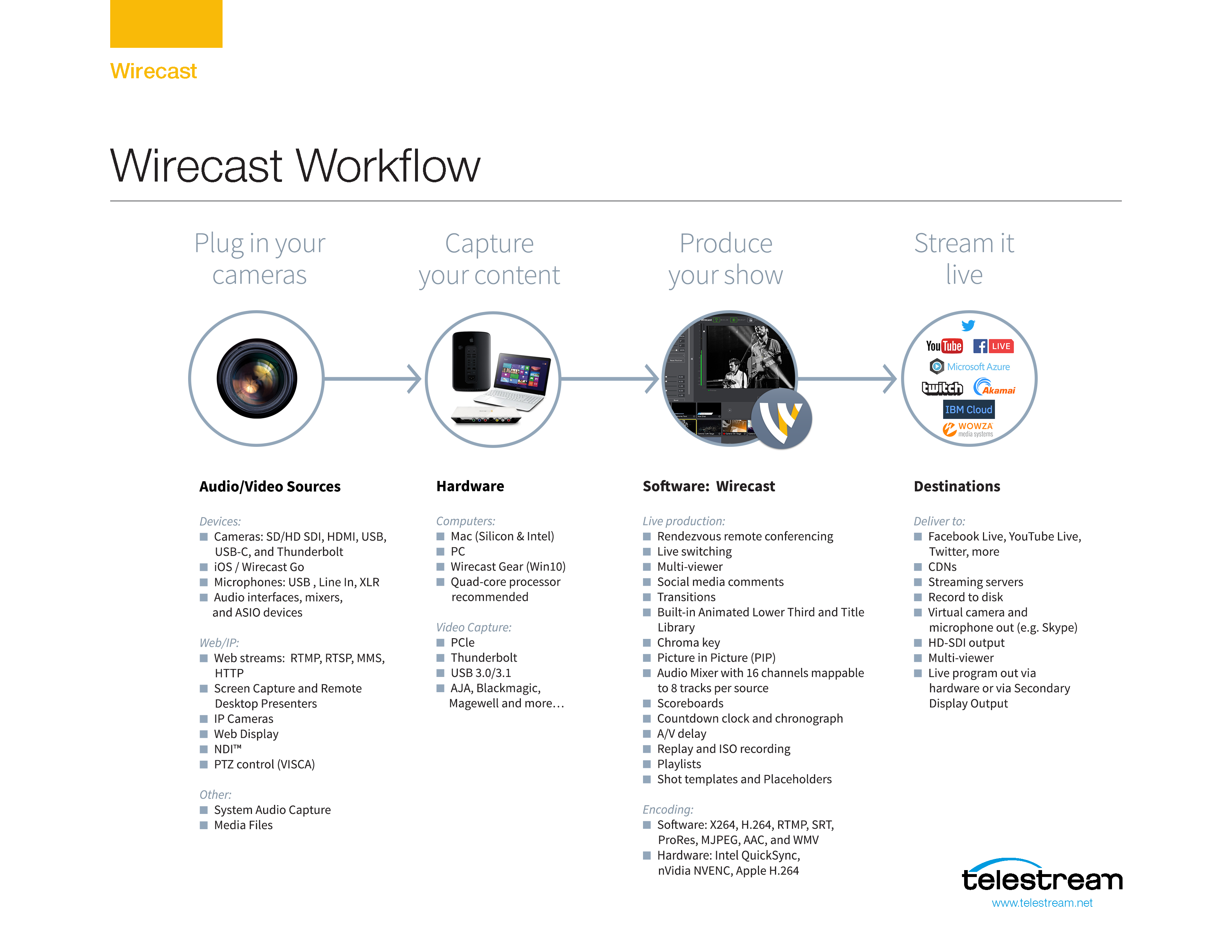
Wirecast fits well at the center of a broadcasting workflow. Wirecast replaces T-bar switchers, graphics generators, and title generators. Alternatively, use Wirecast simply as the back-end encoder for a switcher.
Wirecast workflows usually follow four-steps:
1.Connect inputs such as cameras, computer outputs, and web feeds.
2.Capture content.
3.Produce the program.
4.Stream the program live, or record it to a local drive.
Two Ways to Use this Application
There are two different ways you can use Wirecast:
In this mode, the presenter also operates Wirecast.
When you are both the presenter and the operator:
•Keep it simple Use few shots so it’s easy to select shots.
•Turn on AutoLive This lets you take each shot live with a single click. To turn AutoLive on or off, select AutoLive from the Switch menu.
•Pre-configure your shots Create all shots prior to the broadcast. Set up the logo and titles ahead of time. Don’t create or modify shots while presenting.
•Use hot-keys for switching shots Assign hotkeys to your shots with the Wirecast hotkey editor.
In this mode, one person runs Wirecast, while another makes the presentation.
When you are the operator for a separate presenter:
•Turn AutoLive off This lets you make several changes before taking a shot live. To take a shot live quickly, press Command+and click the shot. To turn AutoLive on or off, select AutoLive from the Switch menu.
•Open the Preview Area Use Preview mode to examine each shot before taking it live. To turn Preview display on or off, select Preview from the Layout menu.
•Open Layer Windows Layer windows let you quickly switch between shots on several layers. To open a layer window, select Window > New Layer Window.
Wirecast Resources
For information about Wirecast, visit these Telestream resources.
Tutorials, Webinars, and Demos
To learn Wirecast basics quickly, work through the Tutorials in the Wirecast User Guide. The project built into Wirecast supports these tutorials. The three tutorials take about thirty minutes, total.
Find tutorials, webinars, and product demos on the Wirecast Training Resources page:
https://telestream.net/telestream-support/wire-cast/training.htm
Find more tutorials, webinars, and product demos on Vimeo at these locations:
Wirecast Webinars
Wirecast Tutorial Series: Part I
Wirecast Tutorial Series: Part II
For tips to improve your broadcasts, see Making Great Broadcasts.
Wirecast Help, Guides, Knowledge Base, and Literature
Find Wirecast literature, user guides, and customer case studies on the Wirecast Literature and Documentation page. Find Wirecast technical articles on the Wirecast Knowledge Base.
Wirecast Virtual Assistant Help
To get instructions on using Wirecast from the Wirecast Virtual Assistant, do the following:
1.Select Help > Wirecast Virtual Assistant.
Wirecast opens the Wirecast Virtual Assistant dialog.
2.Type your question into the field labeled, Please enter your question, and press Enter.
See Wirecast Virtual Assistant.
Wirecast Literature and Documentation
https://telestream.net/wirecast/resources.htm#docs
https://telestream.net/wirecast/resources.htm#docs
Wirecast User Group on Facebook
https://www.facebook.com/groups/wirecastusers/about
The User Interface
For descriptions of the Wirecast menu items, tools and windows, see Windows, Controls, and Menus.